Hello, my name is Ravi Sagar, I am the principal consultant and founder of Sparxsys Solutions. We are an Atlassian Consultancy company based in the UK, India and UAE. We help companies get the most out of Atlassian tools like Jira, Confluence, Bitbucket and we specialise in automation, integrations, Forge app development, ScriptRunner for Jira and Cloud migrations.
Today is the first day of 2021 and I thought it will be good to write a blog. The day was nothing different from other days, no actually I was working today. I think it is a good to work on the first day of the year. I just realised that I will be 40 this year. Couple of years back I made a list of things I want to do when I am 40. When I look at my goals of the last few year I think I am consistent. Few years ago I tried writing a post everyday. I mean a real shareable post, I do share everyday in the form of a video now a days but I tried sharing updates every day. I think it is not really necessary. You can't possible be in the right state of mind to share content everyday. So this year I will not try to share everyday, like a proper blog post but let us see if I can be at least…
Another year has come to an end and it is time to reflect back on the year which for many was not the best one, probably really bad for some. For me it was overall quite ok, I would say actually quite good.
I share quite lot of things already through out the year on this blog which is no longer just a blog but a proper site but in the past 13 years I have been writing year end and half yearly updates on this site. I think it is a good idea to look back on what happened in the past one year. From time to time I read my own blog which I am sure I am the only one reading them who knows? :) but when I read them I feel so good and makes me calm that I am doing the right thing. Sometime around 2011 I started writing my goals and planning everything I do in my life around these goals…
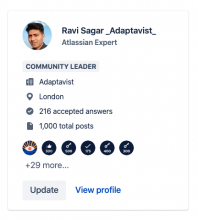
Today I answered a question on the @atlassian #community and the moment I pressed the submit button I noticed something. There is a count on the right hand that shows the number of posts, which changed from 999 to 1000. There was no loud bang or colourful animation but it felt so good.
Some statistics as of 28th December 2020
Likes received: 311
Likes given: 183
Answers submitted: 611
Total posts: 1,000
Question asked: 1
What is Atlassian Community?
It is a place where you can ask questions and help others around Atlassian tools. People who are super active and answer lot of questions (like me) are called Community Leaders but anyone can post answers. It is a great place to seek information which might not be easily available in the official documentation.
Benefits of…
My biggest challenge I think is to organise my content. I have plenty of videos, articles, kb and tips on this site. When I started this blog, it was meant to be nothing but a blog but over the years I think my blog has become more or less like a site or a knowledge base. I am happy with that actually.
The problem however is to organise the content that I already have to that anyone who is coming to this site to seek information can find it easily. It will be a shame if you come to my site and leave without finding what you were looking for.
So I am writing this blog to help you.
My target audience
Want to learn Jira and Atlassian tools?
Want to learn Drupal?
Love Programming?
Want to learn Linux?
Interested in Open Source?
Interested in Automation?
Want to learn Emacs and…
2020 is over in few days, it is hard to believe what all happened so far this year but let us hope for a great future.
For me it was all good, I worked from home all year like every other year :) so I feel fortunate that it was all smooth for me. Yes I do miss going out, drinking with friends and other things that normal people do. This year I spent lot of time in front of computer, a little more than usual. One thing I couldn't do this year was traveling to India. I had my ticket all booked and was really looking forward to my trip but couldn't. Life in UK is all good but nothing like Delhi, if you know what I mean ;)
Anyways not everything is in our control, for people like me who grew up in 80s and 90s in Delhi we never saw anything of this scale in our lives but there is first time…
Atlassian changed their focus towards cloud when they announced that they will stop the server version of their applications in near future. Data Centre will continue but with this new focus majority of small to medium size Jira instances have to migrate to the Cloud. Now server version of Jira has always been the choice for organisations where there was a need to customise Jira exactly the way they want and also the wide availability of apps which makes the server version desirable. There are other benefits related to privacy etc. but in this blog I wanted to focus on one area, automation.
Jira is a tool that people use to solve their problems, to work faster and efficiently. On server version ScriptRunner for Jira has been the number 1 choice for doing automation and the good news is…
There was a question on the community about negating a specific keyword using Regular Express.
Use case: You want to not run the Automation rule when a release is created with name "norelease".
So in this case when you created a new rule with Version created trigger then use the following regular expression.
^(?!.*norelease).*$
Enjoy!
When using Automation for Jira you may use regular expressions along with Smart Values (if needed)
Use the "contain regular expression” condition to match for multiple keywords like this.
^(Keyword 1|Keyword 2|Keyword 3)
This will save time and makes your automation neat :)